BLOG: FIELD NOTES
What Is a Webhook? A Plain-English Guide With a Shopify Example
Webhooks sound technical, but the idea is simple: one app tells another app the moment something happens. This guide explains what a webhook is, how it differs from checking on a schedule, and how it works for a Shopify order, including the duplicate and error problems that trip people up.
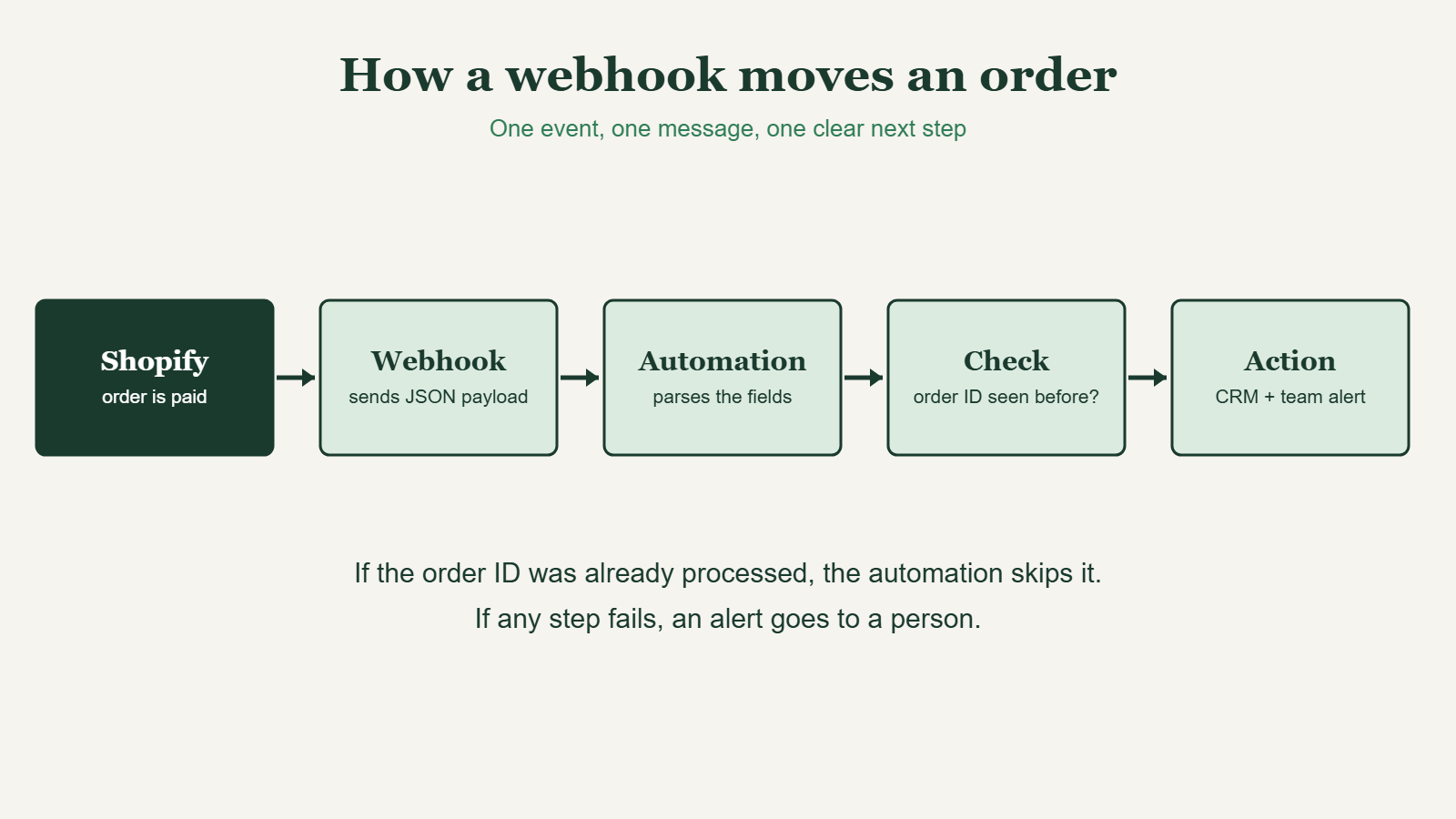
FIG. 00: One event, one message, one clear next step.
QUICK ANSWER
What is a webhook?
A webhook is a message one app sends to another the moment something happens, such as a new order. It carries the data in a format called JSON, so the receiving app can act on it right away instead of checking on a schedule.
How does a webhook work?
- An event happens. For example, a customer pays for an order.
- The app sends a message. It makes an HTTP POST request to a URL you provided, called the endpoint.
- The message carries a payload. The payload is the data about the event, written in JSON.
- The receiving tool reads it and acts. It might create a CRM contact, tag the order, or alert your team.
- The receiver confirms. It replies with a success code. If it does not, the sender may try again.
What is the difference between a webhook and polling?
Polling means an app checks another app on a schedule, such as every few minutes, to see whether anything changed. A webhook pushes the news when it happens. Webhooks are faster, and nothing runs until there is something to report.
What does a Shopify webhook look like?
When an order is paid, Shopify can send an orders/paid webhook. The payload is JSON with fields such as the order ID, the total price, the line items, and the shipping address. Here is a trimmed example, simplified for reading:
{
  "id": 1234567890,
  "total_price": "84.00",
  "line_items": [
    { "title": "Sample product", "quantity": 2 }
  ],
  "shipping_address": { "country_code": "PH" }
}
An automation can read total_price, line_items, and shipping_address.country_code, then use multi-step conditional routing to tag wholesale, international, and gift orders and send each one to the right queue. The diagram above shows the whole path.
Why do webhooks sometimes run twice?
Senders retry when a delivery seems to fail, so the same message can arrive more than once. If your automation creates a contact or a deal every time, you end up with duplicates. The fix is an idempotency check: store each order ID in a lookup table and skip any ID you have already seen.
How do you keep webhooks safe and reliable?
- Verify the signature. Shopify signs its webhooks, so you can confirm a message really came from Shopify.
- Keep the endpoint URL private. Anyone who has it can send messages to it.
- Add an error alert. When a step fails, a person should see the order details.
- Test with real payloads. Replay real order data and try duplicates, missing fields, and international addresses.
- Write it down. Note what the webhook does and who owns it.
When do you need a raw webhook instead of a Zapier or Make trigger?
The Shopify triggers in Zapier and Make usually handle the webhook for you. Use a raw webhook when an app has no ready-made connector or when you need control over the payload. That is the work I do in API integrations and webhooks. If you are choosing a tool, read my comparison of Zapier vs Make for Shopify, and for the workflows to build first, see the Black Friday 2026 Shopify automation checklist.
Frequently asked questions
What is a webhook in simple terms?
A webhook is like a doorbell for apps. When something happens, one app rings the other and hands over the details, so the second app can respond immediately.
What is the difference between a webhook and an API?
With an API, your app asks another app for data. With a webhook, the other app tells you when something happens. Many setups use both.
Do I need to code to use webhooks?
Not for most uses. Zapier and Make can give you a webhook URL and show you the fields in the payload. Code helps for custom connections.
What is a payload?
The payload is the data a webhook carries, usually written in JSON. For an order, it includes fields such as the order ID, total, items, and address.
Why did my automation run twice?
The sender probably retried the delivery, so the same message arrived twice. Add a check on the order ID before anything is created, so repeats are skipped.
Are webhooks secure?
They can be. Keep the endpoint URL private, verify signatures where the app provides them, and send alerts on errors. Treat payloads that contain customer data with care.
NEED A WEBHOOK SET UP?
Connect the apps that have no ready-made connector
I build API integrations and webhook workflows with duplicate checks and error alerts.