BLOG — FIELD NOTES
Black Friday 2026 Shopify Automation Checklist: What to Automate Before November 27
Black Friday is November 27 and Cyber Monday is November 30. Here are the five Shopify workflows to build, test, and freeze before then, with the webhooks and logic behind each.
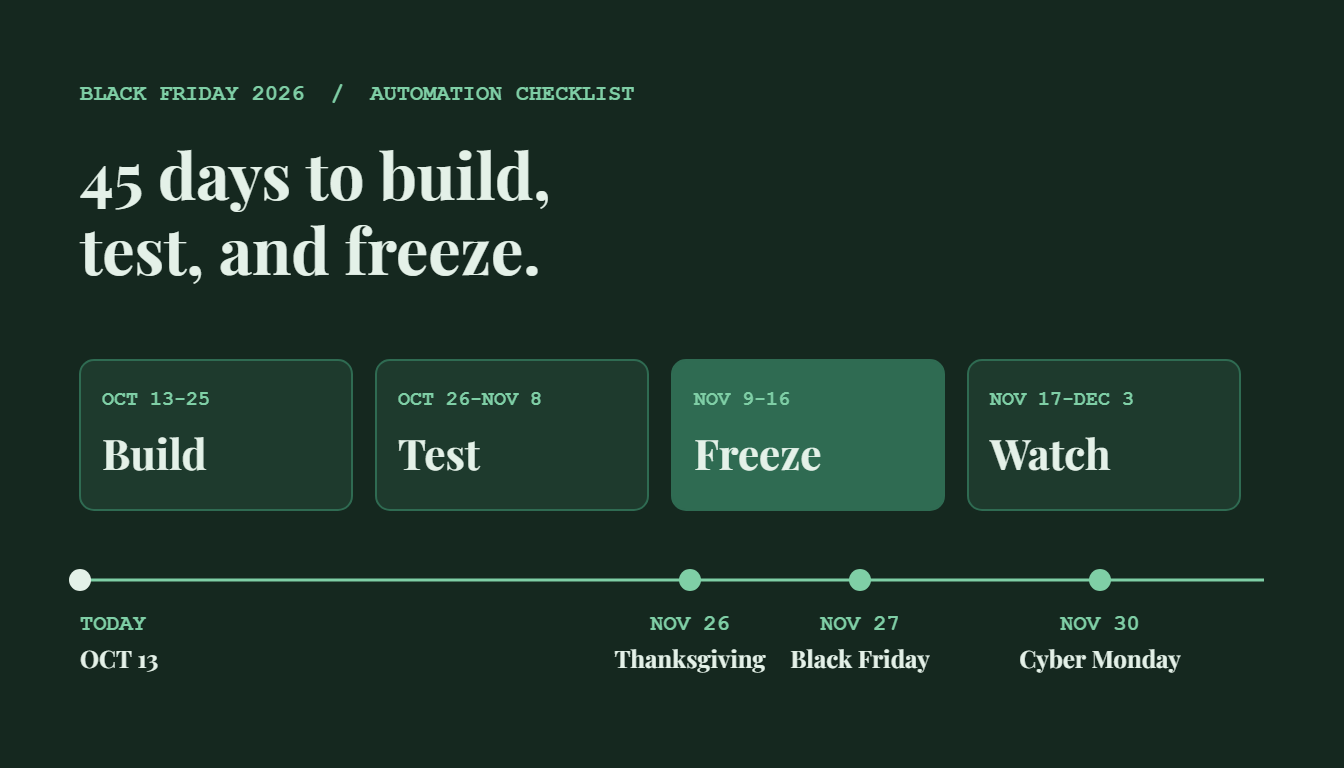
FIG. 01: The 45-day runway from today to Black Friday.
QUICK ANSWER
What should you automate before Black Friday 2026?
Automate five things on Shopify before November 27: order routing and tagging, “where is my order” replies, low-stock alerts, risk holds on suspicious orders, and error alerts. Build them by October 25, test with real order payloads through November 8, and freeze changes on November 16 so Cyber Week runs on proven workflows.
Black Friday is Friday, November 27, 2026, and Cyber Monday is November 30. Adobe forecasts $275.1 billion in US online holiday spending. The orders will arrive whether your workflows are ready or not. Today is October 13, which leaves 45 days.
Why Start Shopify Automation Before Black Friday in October?
Adobe’s September 28 forecast puts US online spending for November 1 to December 31 at $275.1 billion, up 6.7%. It expects Cyber Week to bring in $47.5 billion, 17.3% of the season. Cyber Monday is projected as the biggest day at $15.1 billion, while Black Friday, at $12.9 billion, is growing faster at 9.2%. Deloitte projects holiday e-commerce growth of 7.5% to 8.4%, against 4% to 4.8% for all retail.
These are forecasts, not results. The planning point holds either way: peak days concentrate order volume, support tickets, and stock movement into a few hours. Workflows built in a rush during November tend to fail at exactly that volume.
What Is Shopify Order Automation?
Shopify order automation is the use of webhooks and workflow tools such as Zapier or Make to act on each order without manual handling. It tags the order, routes it to fulfillment, updates a CRM, and alerts a person only when something breaks. See the Shopify order automation service for how I build it.
The 5 Shopify Automations to Build Before November 27
1. Order routing and tagging
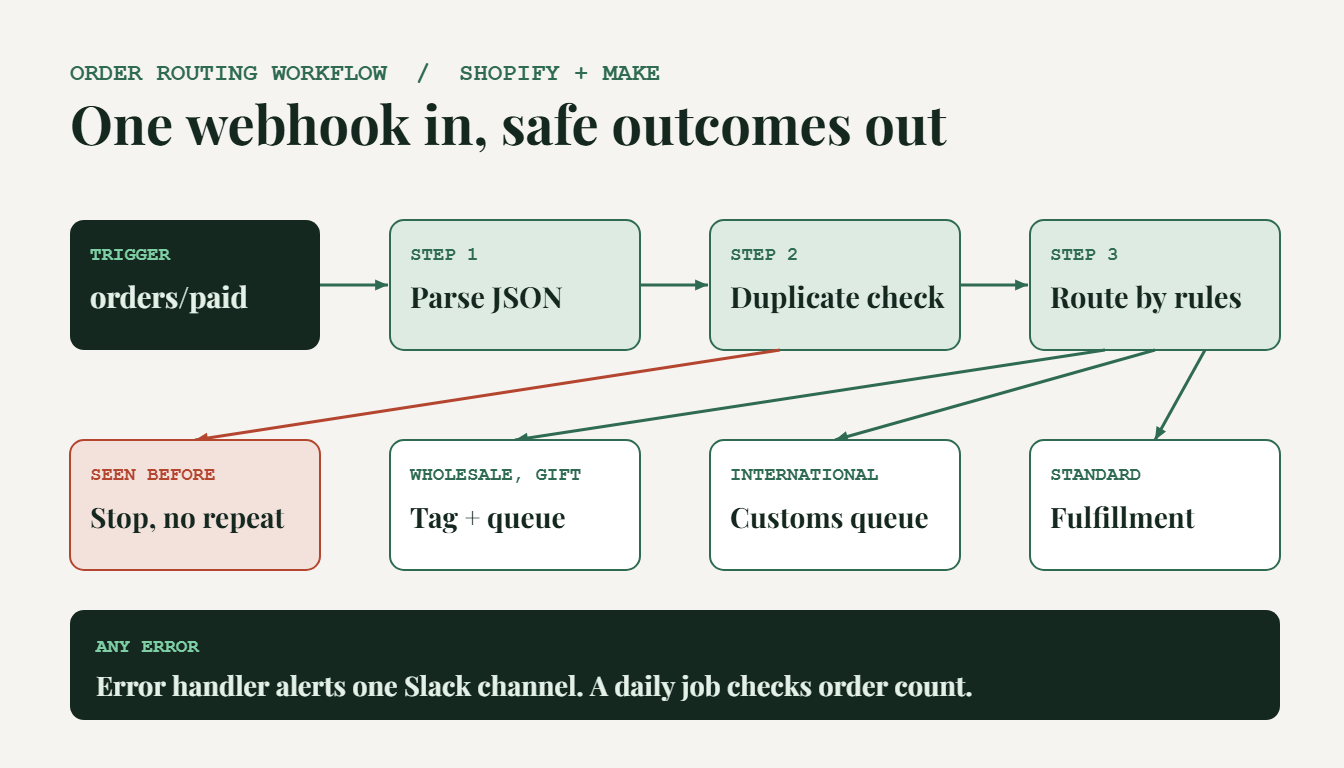
Trigger on the orders/paid webhook. Parse the JSON payload, then use multi-step conditional routing on fields such as line_items, shipping_address.country_code, and total_price. Tag wholesale, international, and gift orders, and send each to the right fulfillment queue or Slack channel. Add an idempotency check on the order ID in a lookup table, because Shopify retries webhook deliveries that fail and a retry must never process an order twice. Orders can also sync to a CRM through HubSpot workflow automation.
2. “Where is my order” replies
Look up the order by number or email through the Shopify Admin API, read the fulfillment status and tracking number, and draft or send the reply from your help desk. Send automatically only when the status is clear. Anything else goes to a person. Put carrier cutoffs in the template: USPS recommends mailing by December 17 for Ground Advantage and First-Class Mail and December 18 for Priority Mail, and FedEx targets December 24.
3. Inventory alerts
Trigger on the inventory_levels/update webhook. Compare the available quantity to a per-SKU reorder point stored in a lookup table, then post an alert to Slack and log a row in a sheet. Someone can then pause an ad or restock before you oversell.
4. Risk holds on suspicious orders
On orders/create, look up the order’s risk assessment through the Admin API. If the risk is high, tag the order “review” and notify a person. Do not cancel automatically. A human should make that call.
5. Error alerts and a daily reconciliation
Route every Zapier error and Make error handler to one Slack channel. Then run a scheduled daily scenario that compares the Shopify order count to the rows your workflows processed and flags any gap. Silent failure is the real risk, and this catches it. The API integration and webhooks service covers custom payload mapping when an app has no native connector.
Black Friday Automation Timeline: October 13 to December 3
This is the schedule I recommend. It is not a platform requirement.
| Phase | Dates | Goal |
|---|---|---|
| Build | Oct 13 to 25 | Build the five workflows and the error channel |
| Test | Oct 26 to Nov 8 | Replay real order payloads. Test duplicates, missing fields, and international addresses |
| Freeze | Nov 9 to 16 | Fix defects only, document each workflow, then freeze changes on Nov 16 |
| Watch | Nov 17 to Dec 3 | Check the error channel daily and review the reconciliation report |
Zapier or Make for Black Friday Volume?
Zapier counts a task for each action step. Make counts an operation for each module run. As an example, 1,500 orders a day at 8 steps each is 12,000 operations in one day. Size your plan against your peak day, not your average. I use Make where a flow branches or loops over line items and Zapier for short linear flows. Details are on the Zapier and Make automation page.
What Should You Not Automate During Cyber Week?
- Refunds and cancellations, which move money.
- Mid-campaign discount changes.
- Unusual orders, such as high value or mismatched billing and shipping addresses.
The rule: automate reading, tagging, and alerting. Keep decisions that move money with a person. If the remaining work is people work rather than system work, a seasonal virtual assistant can cover it. My virtual assistant services page lists what I handle.
What Results Can Order Automation Deliver?
On the Fire & Pine account, I automated 73% of recurring tasks while the store handled 100 to 150 orders a day and shipped 95% of them the same day. The full write-up is in the case studies.
Frequently Asked Questions
When is Black Friday 2026?
Black Friday 2026 is Friday, November 27. Thanksgiving is November 26 and Cyber Monday is Monday, November 30. Adobe counts Cyber Week as the five days from Thanksgiving to Cyber Monday.
What should I automate first for Black Friday on Shopify?
Start with error alerts and order tagging. Error alerts tell you when any other workflow fails, and tagging gives your fulfillment and support teams clean data to work from. Add “where is my order” replies and inventory alerts next.
How long does it take to automate Shopify orders before Black Friday?
In my experience, one workflow takes a few days to build and test. The five workflows in this checklist fit into about two to three weeks, including testing with real order payloads. That is an estimate from my own projects, not a platform benchmark.
Should I use Zapier or Make for Black Friday order volume?
Both work. I use Make where a flow branches or loops over line items, and Zapier for short linear flows. Estimate your peak-day operations first: 1,500 orders at 8 steps each is 12,000 operations in one day, and your plan limit must cover that.
Is it too late to automate in November?
No, but narrow the scope. Build error alerts and order tagging only, test them on real orders for several days, and leave the rest until after December 3. A workflow launched during Cyber Week with no testing adds risk instead of removing it.
Sources: Adobe, US holiday shopping forecast, September 28, 2026; Deloitte holiday e-commerce forecast, via MarketScale; USPS recommended 2026 holiday mailing deadlines, via KOLD.
WANT THESE RUNNING BEFORE CYBER WEEK?
Get your Shopify workflows built, tested, and frozen on time
I build and test order, support, and inventory automations for Shopify stores on Zapier and Make.